


Social Media CRM Integration for Small Businesses That Captures Every Lead
- akash65800
- Jun 29
- 14 min read
Introduction
Every day, small businesses post on social media, engage with followers, and drive traffic to their websites. But here is the problem many of them face: those hard-won leads often disappear into thin air. A person comments on a post, visits your site, maybe even fills out a contact form. Then... nothing. No follow-up. No nurturing. The lead goes cold.
This happens all the time. According to 2026 lead generation statistics, around 80% of new leads never convert into sales,

mainly because businesses lack a proper system to capture and nurture them effectively.
The truth is, social media has become a primary source of new leads for small businesses. Research shows that roughly 66% of marketers generate leads through social media by spending just six hours per week on it. That is an incredible return on a small time investment. But here is the catch: without the right tools, those valuable leads slip away before you ever get a chance to follow up.
This is where integrating your social media management platform with a CRM changes everything.

When your social media management platforms connect directly to a CRM, manual data entry becomes a thing of the past. No more copying and pasting names and emails into a spreadsheet. Instead, every like, comment, share, and click gets captured automatically. Follow-up emails get triggered without you lifting a finger. And most importantly, no lead ever falls through the cracks.
But a unified system is only one piece of the puzzle. To truly grow your business online, you also need a solid website foundation and strong search visibility. Many small business owners find that choosing an affordable SEO agency for your small business helps fill that gap,

ensuring the traffic you work so hard to generate actually leads to real conversions.
So what should you look for in a unified system? And how do you get started without spending a fortune or wasting weeks on setup?
This guide breaks it all down. We cover the why behind CRM and social media integration, the how of setting it up for your business, and the what to look for when choosing social media management platforms that actually work with your sales tools. Every step is designed for small teams with limited time and budget.
Let's dive in.
Why Small Businesses Need Social MediaâCRM Integration
Here is the reality for most small business owners in 2026: social media generates a huge chunk of your leads. In fact, research shows that 94% of B2B marketers use LinkedIn for lead generation, and the platform alone drives roughly 80% of all B2B social media leads (warmly.ai lead generation statistics). Even if you run a local service business, platforms like Instagram, Facebook, and TikTok are where your customers hang out and discover new brands.
But here is the problem: those leads rarely convert on their own.
Think about what happens right now. A potential customer comments on your post asking for pricing. You reply. They send a direct message. Maybe they click the link in your bio and fill out a contact form. But there is no system connecting these actions. So the person who commented gets forgotten. The DM sits in your inbox. The form submission might land in a spreadsheet you check once a week.
That is a leaky bucket. And it costs you real sales.
When you connect your social media management platforms directly to a CRM, the entire process changes. Every comment, message, and ad click flows automatically into a customer record. No manual data entry. No missed follow-ups. The CRM becomes your single source of truth for every single interaction.
Why does this matter so much? Because a unified view of your customer data lets you personalize your outreach.

You know exactly where the lead came from, what they asked about, and how they engaged with your brand. That context makes your follow-up emails, offers, and messages feel relevant instead of spammy. According to the 2026 B2B lead generation report, nearly half of marketers already use LinkedIn daily for lead generation, and personalization remains the biggest challenge. Integration solves that by giving you the data you need to personalize at scale.
Beyond personalization, integration also improves segmentation. You can sort leads by the social channel they came from, the campaign that drove them, or their level of engagement. Then you send the right message to the right person at the right time. It is the difference between blasting generic promos and having real conversations that convert.
For small businesses with limited time and budget, this integration is not a luxury. It is a necessity. Without it, you are leaving money on the table.
Once your social media and CRM are talking to each other, the next step is making sure your website and search presence are equally optimized. If you are exploring better website options, check out our guide on the best GoDaddy alternatives for small business owners to build a stronger online foundation that supports your growing lead pipeline.
How Social Media Management Platforms Centralize Outreach
Let's be real for a second. Most small business owners are juggling three or four tabs just to handle social media. One tab for scheduling posts. Another for checking comments. A third for answering DMs. And maybe a spreadsheet somewhere tracking who asked about pricing.
It is exhausting. And messy.
That is where social media management platforms come in. Tools like Hootsuite, Buffer, and Sprout Social are not just for scheduling.
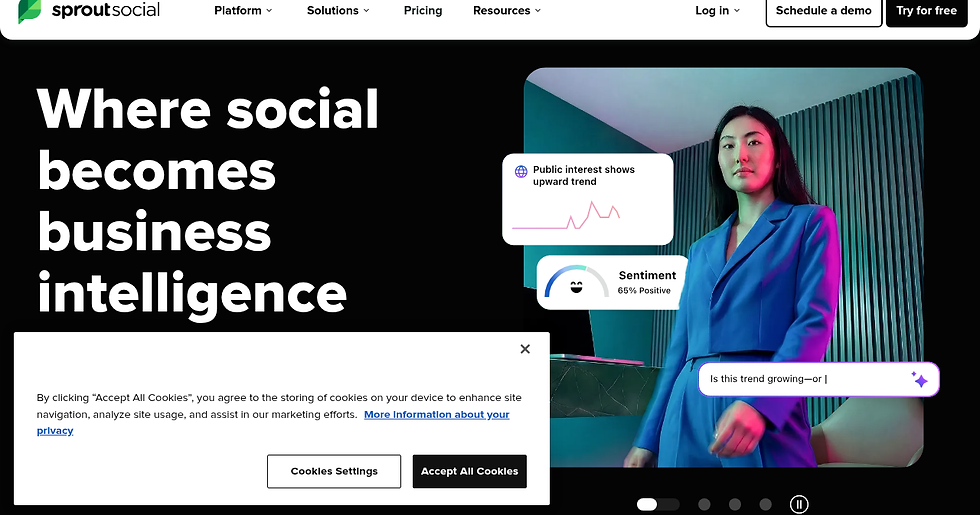
They are built to centralize everything into one dashboard. Think of them as mission control for your entire social presence.
Here is what happens when you use one. Instead of logging into Instagram, Facebook, LinkedIn, and TikTok separately, you see all your messages, comments, and mentions in a single unified inbox. You reply from one place. You schedule posts across every platform from one calendar. And every engagement gets tracked automatically.
But the real magic is what happens behind the scenes. These platforms capture engagement data likes, comments, shares, and messages and push that information directly into your CRM. No manual copying. No forgotten leads. The data flows in automatically and creates a full customer record.
Take Sprout Social as an example. It offers a Smart Inbox that pulls every interaction into one stream. But more importantly, it includes what many call social CRM functionality. That means every conversation gets linked to a contact record inside your CRM platform. You can see exactly what a lead asked about, when they asked, and how you responded. That context is gold for follow-up.
A recent comparison of the best social CRM software platforms for 2026 shows that tools like Zoho Social and HubSpot Marketing Hub offer native integrations with their own CRM systems. That means social activity ties directly to pipeline reporting and lead tracking without needing extra software.
Advanced platforms also include built-in lead capture forms and chatbots. Imagine a customer visits your Instagram profile, clicks a link, and fills out a form that pops up inside the platform. That form submission flows straight into your CRM pipeline. No manual entry. No delay. The lead is already in your system before you finish your coffee.
For small teams that need to simplify their tech stack, some platforms like Bitrix24 combine CRM, project management, and social channel integrations in one place. That kind of centralization saves hours every week.
The bottom line: social media management platforms turn chaos into clarity.

They gather every interaction, store it automatically, and give you the context you need to follow up like a pro. If you are tired of losing leads in the noise, this is the fix.
Once your outreach is centralized, the next step is making sure your overall digital strategy supports your growth. If you are ready to take a more hands-off approach, check out our guide on how to choose an affordable SEO agency for your small business to keep your pipeline full without burning out.
Key Features to Look for in a Unified Platform
So you know why centralizing your outreach matters. But not all platforms work the same way. Here are the three features that separate the helpful tools from the confusing ones.

Lead Capture Forms That Work Automatically
The best social media management platforms do more than organize your inbox. They actively capture leads for you.
Here is how it works. A potential customer sends you a direct message on Instagram. Or they click your Facebook ad. Instead of just seeing that interaction in your inbox, the platform can trigger a lead capture form. The form pops up right inside the chat or as a follow-up link. The customer fills in their name, email, and what they need.
That information then creates a new record inside your CRM platform automatically. No manual typing. No lost details. The lead is saved and ready for follow-up before you even finish the conversation.
Platforms like Zoho Social take this further by offering native lead tracking inside their CRM. According to a 2026 comparison of the best social media management tools, Zoho Social's CRM integration makes it easy to connect social interactions directly with contact records. That means every conversation gives you context for the follow-up.
Automated Lead Scoring and Routing
Not every lead is ready to buy right now. Some are just browsing. Others are asking about pricing. A good platform tells the difference for you.
Automated lead scoring uses rules you set to rank each lead based on engagement level. Did someone click your link three times? High score. Did they just post a comment? Lower score. The platform does this without you lifting a finger.
Once a lead scores high enough, the system routes it to the right person on your team. Sales gets the hot leads. Support handles the questions. No one fights over who follows up.
One detailed breakdown of the best social CRM software for 2026 highlights how tools like Sprout Social and HubSpot tie social activity to pipeline reporting and lead tracking. That means you see exactly which social posts create your most valuable leads.
Real Time Synchronization
Here is the problem most people run into. A customer sends a message on Facebook. Then they email you. Then they fill out a form on your website. If these channels don't talk to each other, you end up with two or three records for the same person.
Real time synchronization fixes this. Every interaction updates the same customer record instantly. If a lead fills out a form after sending a DM, the platform adds that form data to the existing record. No duplicate entries. No confusion.
This keeps your customer data current and clean. And it matters more than you think. When you have accurate data, your follow up feels personal instead of robotic.
If managing all this still sounds like too much work, you might prefer a setup that handles everything for you. Some businesses choose to work with a service that combines website development, SEO, and lead automation in one subscription. You can read about best GoDaddy alternatives for small business owners if you want a simpler tech stack that still delivers results.
The right platform turns social media from a time suck into a lead machine. Pick one with these three features, and you will never lose a lead in the noise again.
Step-by-Step Integration Guide: From Social Account to CRM Lead
You have the features down. Now let's get your social accounts talking to your CRM. The whole process takes about an hour the first time, and after that it runs on autopilot. Follow these three steps to make the connection happen.
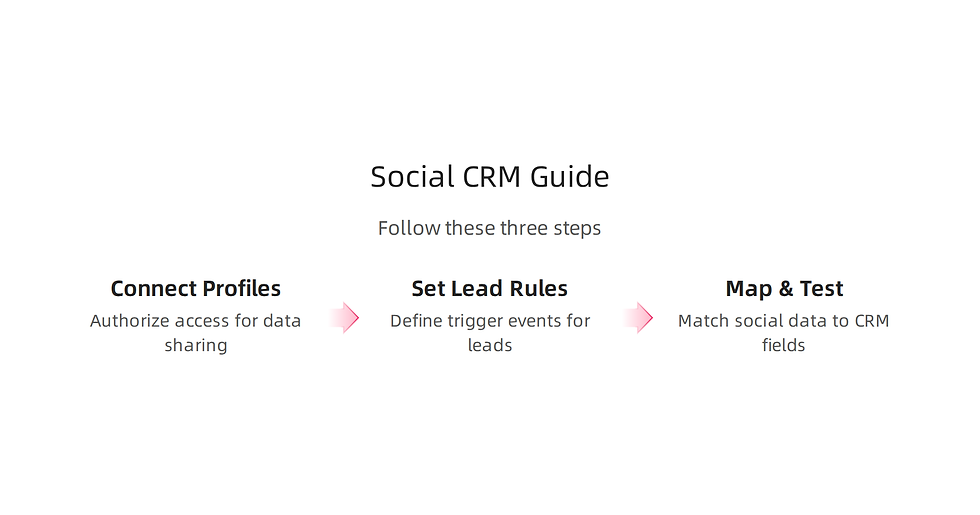
Step 1: Connect Your Social Profiles and Authorize Access
Open your social media management platform and find the integration or connections section. Every tool works a little differently, but the basic idea is the same. You log into each social account from inside the platform and grant permission for the two systems to share data.
Some platforms, like HubSpot and Zoho CRM, have native integrations. You just click a button and authorize. Others need a helper tool like Zapier. Zapier's guide on social media integration explains how to set up triggers and actions

so that when something happens on social media, it kicks off a chain reaction inside your CRM.
Here is a quick list of what to authorize:
Read access to your direct messages and mentions
Permission to view public profile information
Access to your ad accounts if you run paid campaigns
Ability to post or respond on your behalf (only if you want automated replies)
Step 2: Set Up Lead Capture Rules
Now you tell the system what counts as a lead. This is where the automation magic happens. You create rules that say: "When this event happens, do that action."
Common trigger events include:
Someone sends you a direct message containing the word "pricing" or "quote"
A user comments on one of your posts with a specific keyword like "interested"
Someone clicks a link in your bio or ad
A form submission from a lead gen ad on Facebook or LinkedIn
Once the trigger fires, the action creates a new lead record in your CRM. You can also tag the lead based on the trigger. For example, if someone asks about pricing, tag them as "hot lead." The Flowlu guide on integrating social media with CRM recommends setting up multiple automations to handle different intents. That way every lead gets the right follow-up without you having to think about it.
Take time to think about what actions your real customers take before they buy. Use those signals as your triggers.
Step 3: Map Data Fields and Test the Integration
This step keeps your CRM clean. You need to tell the platform which piece of social data goes into which CRM field.
For example:
Social profile name goes to the Contact Name field
Email from the form or chat goes to the Email field
Message content goes to the Notes or Description field
Source platform (Instagram, Facebook, LinkedIn) goes to a custom Lead Source field
Most platforms let you map these fields visually. Drag and drop until everything lines up.
After mapping, run a test. Send a test message from each social account you connected. Check that the lead shows up in your CRM with the right fields filled in. The social CRM guide from Meegle emphasizes testing with real scenarios, like submitting a test lead from each platform to confirm the data lands correctly. A quick test now saves you from losing a real lead later.
What Next?
Once you confirm the data flows cleanly, turn on the automation and watch the leads roll in. You will never miss a message again.
If configuring all this sounds like a lot of hands-on work, you can also find a partner to handle the technical setup for you. Many small business owners prefer to focus on their core work. You can check out a guide on how to choose an affordable SEO agency for your small business to find a team that builds and manages the whole system while you sleep.
The path from social message to CRM lead is simpler than you think. Just connect, trigger, map, and test. Your future self will thank you.
Best Practices for Nurturing Social Media Leads in Your CRM
By now, your social media feeds are connected to your CRM and leads are flowing in. That is a big win. But here is the thing: getting the lead is only the start. The real question is what you do next. A lead that sits in your database without any follow-up is just a name on a list. To turn those names into paying customers, you need a plan for nurturing them. Here are three best practices that work.

1. Segment Leads Based on Source and Behavior
Not all leads are the same. Someone who sends you a direct message asking about pricing is different from someone who just liked a post. You need to treat them differently. The first step is to segment your leads inside your CRM.
Group them by where they came from. Was it Instagram, Facebook, LinkedIn, or a lead gen ad? Also look at how engaged they are. Did they click a link? Did they ask a question? Use that information to assign a lead score.
You can also segment by demographics if your CRM captures that. The goal is to send the right message to the right person at the right time. Following Advanced Strategies for Integrating Social Media and CRM helps you set up these segments so your follow-up feels personal and relevant.
2. Use Automated Workflows to Follow Up
Manual follow-up works, but it takes time. And time is something most small business owners do not have. That is where automation helps. Set up triggers inside your CRM that start a workflow the moment a new lead arrives.
For example, when a lead comes from a Facebook ad asking for a quote, your CRM can automatically send them a welcome email with pricing details. If they open the email but do not reply, the system can send a follow-up SMS two days later. You can even assign the lead to a sales rep based on the trigger.
The 10 best social CRM tools for 2026 include built-in workflow builders that make this easy. If your CRM does not have one, you can use a third-party tool to connect everything. Either way, set up a sequence that moves the lead forward without you lifting a finger.
3. Personalize Every Message with Social Context
Automation is great, but it should not feel robotic. The best lead nurturing uses the context from the social interaction to personalize the message.
Here is an example. A lead commented on your post about lawn care tips. When your CRM captures that lead, your first message should mention that comment. Something like: "Hey, I saw you liked our lawn care tips. Would you like a free quote for your yard?" That feels human because it references the actual conversation.
Your CRM record should store the post or comment the lead engaged with. Pull that detail into your email or message. The 15 best social CRM software platforms for 2026 show you how to sync this social context directly into your lead fields.
Make Sure Your Website Supports Your Efforts
Your CRM and social accounts are only half of the picture. If your website is slow, hard to navigate, or not mobile-friendly, even the best lead nurturing will fall flat. People click through from social media expecting a smooth experience. If they do not get it, they leave.
Check your site's performance and consider upgrades if needed. The best Godaddy alternatives for small business owners help you build a fast, modern website that turns visitors into customers. When your website works well with your CRM, your nurturing efforts get a lot more effective.
Nurturing social leads in your CRM does not have to be complex. Segment your leads, set up automated follow-ups, and personalize every message. Your leads will feel understood, and your sales will grow naturally.
Measuring ROI: KPIs for Social Media Lead Generation
You are putting time and money into social media. Maybe you are running ads, posting content, or using lead gen forms. But how do you really know it is working? That is where ROI comes in. Measuring return on investment helps you see which platforms and tactics actually bring in customers.

Without the right KPIs, you are guessing. Here are three metrics that matter most.
Track Cost Per Lead (CPL) by Platform
Cost per lead tells you how much you spend to get one lead from a specific social channel. For example, if you spend $200 on Facebook ads and get 10 leads, your CPL is $20. If you spend the same on LinkedIn and only get 4 leads, your CPL is $50.
Some channels give you cheaper leads. Others give you higher quality leads that convert better. You need to compare them. According to the Lead Generation Statistics 2026: Benchmarks & Trends report, SEO has the lowest CPL at around $31, while events can cost over $800. Social media sits somewhere in the middle. Track your own numbers every month. If one platform costs too much per lead, try a different one.
Monitor Lead-to-Opportunity Conversion Rates
Getting a lot of leads is nice. But not all leads are ready to buy. You need to know how many of those leads actually become real opportunities that your sales team can work with.
A typical conversion rate from lead to qualified opportunity is between 2% and 5%, based on Content Marketing ROI Benchmarks for B2B SaaS (2026 Data). That means if you have 100 leads, only 2 to 5 of them move forward. Track this number for each social platform. If one channel gives you tons of leads that never convert, something is off. Maybe the audience is wrong, or your offer does not match. Use this KPI to improve your targeting.
Use Attribution Models to Understand Revenue Impact
The last KPI is the most powerful. It answers the question: which social media touchpoints actually drive sales? Attribution models help you connect the dots.
First-touch attribution gives credit to the first social post a customer clicked. Last-touch gives credit to the last click before they bought. Multi-touch attribution spreads credit across every interaction. For small businesses, a simple last-touch model is often enough to start. But you can move to multi-touch as you grow.
Industry benchmarks show that paid social delivers around $1.75 for every $1 spent, according to the Social Media ROI Statistics Marketers Need to Know in 2026. Knowing which posts and ads bring in revenue helps you spend your budget smarter. If setting up attribution feels too complex, consider working with an affordable SEO agency for your small business to get proper tracking in place.
Focus on these three KPIs and you will stop guessing about your social media ROI. You will know exactly what works and where to invest your time and money.
Blog Summary
This article explains why connecting your social media management tools to a CRM is essential for small businesses that rely on social channels for leads. It covers the main benefits—automatic lead capture, better personalization, segmentation, and real-time data syncing—and highlights the three must-have features: automatic lead forms, lead scoring/routing, and real-time synchronization. You get a practical, three-step setup guide (connect accounts, create capture rules, map fields and test) that a small team can complete in about an hour, plus best practices for nurturing leads with automated workflows and social context. The piece also shows which platforms offer native integrations, offers examples of all-in-one solutions for limited budgets, and explains the KPIs to measure ROI so you can see what actually drives revenue. By following the steps and recommendations here, you'll stop losing leads, deliver more relevant follow-up, and make smarter marketing decisions based on measurable results.

Comments